
Python: Variables & Data Types
VARIABLES
You can think of variables as containers that store data values. Any data you assign to a variable is carried and kept by that variable.
Variable name = 'Data you want the variable to hold'
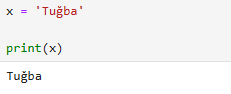
Note: Python automatically detects the type of data you assign to a variable.

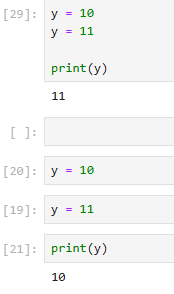
A variable can be overwritten; that is, after assigning a value to a variable, you can retrieve it using the print( ) command and modify the data. In this case, the print( ) output updates according to your changes. Moreover, if you write two variables with the same name but different values consecutively, Python accepts the last assigned value.
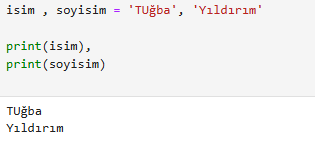
You can create multiple variables simultaneously in Python. This can be done as follows:
First variable name, second variable name = 'data to be stored in the first variable', 'data to be stored in the second variable'
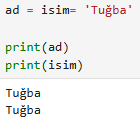
Additionally, you can assign a single value to multiple variables.
First variable name = second variable name = 'the data to be stored in both variables'
You can also assign multiple values to a variable.
Variable name = ['First value', 'Second value']
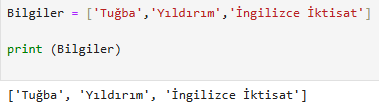
In addition, you can create two different variables and allow them to store the values of the variable you created. For example:
First variable name, second variable name = name of the variable that stores two values
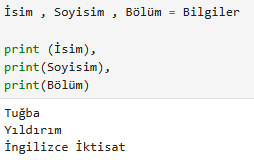
In this way, the first variable will start storing the first value created earlier, while the second variable will store the second value.
Variable Naming Rules
There are some important points to consider when naming variables. The three most common naming styles are as follows:
1-Camel Case
The first letter of the first word is lowercase, while the first letters of the following words are capitalized. For example: variableName. Although this naming style is not common in Python, it may be preferred in some projects.
2-Pascal Case
The first letters of all words are capitalized. For example: VariableName.
3-Snake Case
An underscore (_) is placed between words. For example: variable_name.
Variable names you should avoid:
• Starting with a number: 1variableName.
• Using symbols: Only an underscore (_) is allowed in variable names. For example, symbols such as variable-name are not valid.
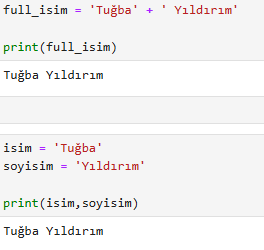
At the same time, in Python, you can print multiple variables together using the print ( ) command. For this, you can use the + operator (or “ ,” ).
DATA TYPES IN PYTHON
A-Numeric Data Types
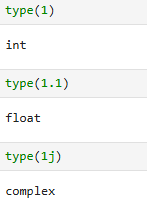
1- Integers
Positive or negative whole numbers. For example: 1, -3, 101.
2- Float
Decimal numbers. For example: 3.17, -0.00001, 28.453.
3- Complex
Imaginary numbers. For example: 3 + 5j (here, 'j' represents an imaginary unit).
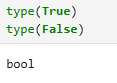
B- Boolean Data Types
1- True
Represents a true value.
2- False
Represents a false value.
C- Sequence Data Types
1- Strings
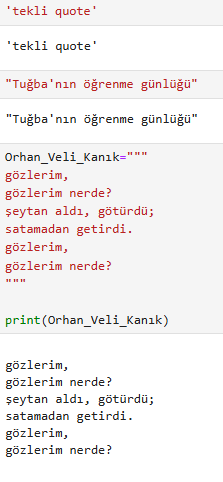
There are three types of strings: single quote, double quote, and triple quote. Single quote: ' ' – Double quote: " " – Triple quote: """ """
If a single quote is used within a string, the string should be written using double quotes. For example: "Türkiye’nin". Similarly, if a double quote is used within a string, it should be written using single quotes: 'Ali "yemek çok güzel olmuş" dedi'. Triple quotes are used for multi-line texts and can contain all types of quotation marks.
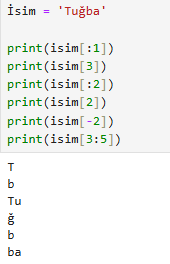
Note: Strings are indexable, meaning you can access individual characters in a string using their index positions.
2- Lists
Lists are data structures that store multiple values in an ordered and mutable manner. Elements within a list can be of different data types (such as string, integer, or float). Additionally, a list can contain another list, allowing the creation of nested lists.
Square brackets [ ] are used to create a list.
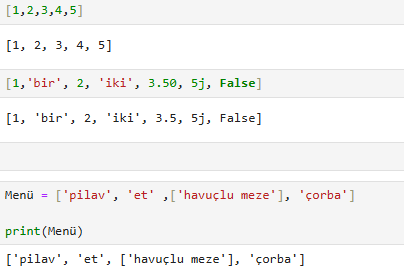
Note: Lists are indexable → Each element has a position number and can be accessed using its index.
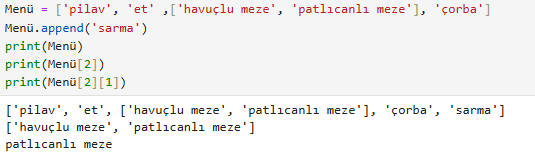
Note: Lists are mutable → The contents of a list can be modified or updated after creation.

3- Tuples
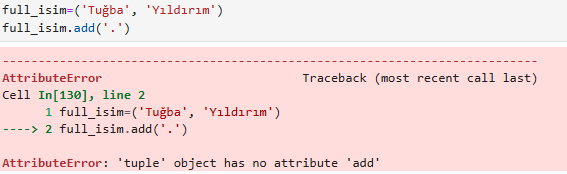
Tuples are similar to lists but are immutable ( ), meaning their contents cannot be modified once created. Tuples are defined using parentheses ( ).
Note: Tuples are indexable → This means you can access their elements using index numbers.
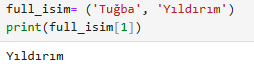
However, the contents of a tuple cannot be changed or updated after creation.
4- Sets
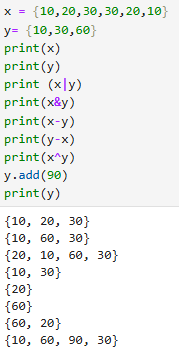
Sets are data structures similar to lists and tuples, but they do not allow duplicate elements. In other words, a set cannot contain the same element more than once.
Sets are created using curly braces { }.
Sets are not indexable → This means you cannot access elements in a specific order.
Elements in a set cannot be modified using index numbers.
However, new elements can be added to a set, and existing elements can be removed.
5- Dictionaries
Dictionaries are data structures composed of key — value pairs. Like lists, they store data, but each value is identified by its unique key.
When creating a dictionary, curly braces { } are used and each key is separated from its value by a colon :
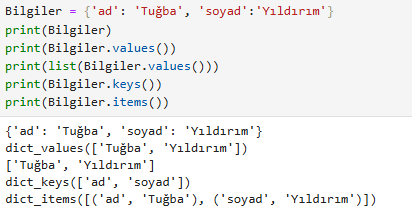
Dictionaries are indexable but in a different way → To access a value, you use its key instead of an index number.

Values in a dictionary can be modified → You can update or change the content of a dictionary.
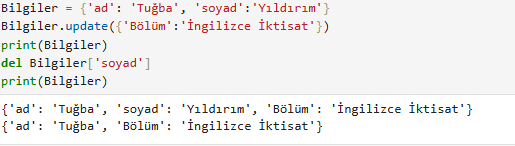
Now you have a solid understanding of variables and data types in Python, the building blocks for any Python project!